

The Ultimate Guide to OLED Dark Mode: Why True Black Matters
If you are using a modern flagship smartphone—whether it’s the latest iPhone Pro model, a Samsung Galaxy S series, or a Google Pixel—you are likely staring at an OLED or AMOLED display. These screens are technological marvels, but most users aren’t utilizing them to their full potential.
The standard colorful, busy wallpapers that look great on LCD screens often look “washed out” or consume unnecessary power on an OLED panel. To truly unlock the capabilities of your device, you need “True Black” wallpapers.
In this guide, we have curated our best OLED-optimized backgrounds from iphoneswallpapers.com. We’ve broken them down by style so you can find exactly what fits your aesthetic, from deep space voids to neon cyberpunk vibes.
The standard colorful, busy wallpapers that look great on LCD screens often look “washed out” or consume unnecessary power on an OLED panel. To truly unlock the capabilities of your device, you need “True Black” wallpapers.
Why “True Black” Matters: The Science of #000000
Before diving into the downloads, it is important to understand why these wallpapers are different. On a traditional LCD screen (like the iPhone 11 or older monitors), “black” is actually just a pixel blocking a backlight. The light is still on behind it, which is why blacks often look like dark grey in a dim room.
OLED (Organic Light-Emitting Diode) is different. Each pixel provides its own light. To display black, the pixel simply turns off.
- Infinite Contrast: Because the pixel is off, the black is perfectly dark. This makes colors next to it pop with incredible vibrancy.
- Battery Savings: Dark Mode isn’t just a trend; it’s a utility. If you use a wallpaper that is 70% true black, 70% of your screen is technically “off” while on the lock screen, significantly reducing battery drain.
- Hiding the Notch/Dynamic Island: True black wallpapers can blend seamlessly with the bezels and camera cutouts, making the hardware disappear.
1. The “True Black” Battery Savers
Best for: Maximizing battery life and minimalism.
This collection features wallpapers composed of at least 80% pure hex-code black (#000000). These are designed for the minimalists who want a clean, distraction-free interface. By keeping the majority of the screen unlit, you are putting the least amount of strain on your battery.
- 20 OLED Wallpapers – (Unlock true infinite contrast with 20 Pure Black (#000000) wallpapers. The ultimate OLED collection for iPhone Pro, Pixel, and Samsung Galaxy devices.)
2. Neon & Cyberpunk: High Contrast Aesthetics
Best for: Users who love the “Retrowave” or “Blade Runner” look.
OLED screens are famous for their ability to render vibrant colors without bleeding. This section focuses on high-contrast neon photography and digital art. The deep blacks ensure the neon pinks, cyans, and purples look like they are physically glowing off the glass.
- [Link 11 Text] – (e.g., Tokyo Night Rain)
3. Deep Space & Astronomy
Best for: Adding depth to your lock screen.
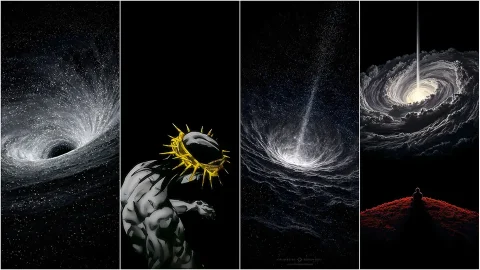
Space is the original OLED playground. The vast darkness of the cosmos combined with the bright, piercing light of distant stars creates a 3D depth effect that flat images can’t achieve. These wallpapers feature high-resolution NASA imagery and digital composites of nebulae and galaxies.
- [Link 21 Text] – (e.g., James Webb Nebula)
4. Moody Nature & Landscapes
Best for: A calming, “Dark Mode” organic vibe.
Nature wallpapers are usually bright and sunny, but those can be blinding at night. This collection features “Dark Mode Nature”—moody, shadowed landscapes like foggy forests, moonlit mountains, and midnight oceans. These images retain the organic texture of nature while strictly adhering to an OLED-friendly color palette.
- [Link 31 Text] – (e.g., Midnight Pine Forest)
5. Abstract & Geometric Patterns
Best for: Keeping your Home Screen icons visible.
Sometimes, a photo is too busy to sit behind your app icons. Abstract wallpapers use geometry, shading, and texture to provide a premium feel without clutter. These backgrounds use gradients of dark grey and black to create a sense of metallic or liquid texture.
- [Link 41 Text] – (e.g., 3D Hexagon Pattern)
How to Check if Your Wallpaper is OLED Optimized
Not all dark wallpapers are created equal. A dark grey wallpaper looks nice, but it does not turn the pixels off like a true black wallpaper does.
If you want to verify the quality of the wallpapers you download:
- The “Dark Room” Test: Go into a completely pitch-black room, turn your phone brightness to 50%, and open the image fullscreen. If you can see a faint grey glow coming from the “black” parts of the image, it’s not true black. If the black parts disappear into the darkness of the room, it is OLED optimized.
- File Format: Ensure you are downloading high-quality JPEGs or PNGs. Heavy compression can sometimes turn true black pixels into “artifact” dark grey blocks, ruining the effect. All the wallpapers linked above are high-fidelity to prevent this issue.
Final Thoughts
Switching to an OLED-optimized background is one of the easiest ways to refresh your phone’s look while gaining a practical battery boost. Whether you prefer the simplicity of a pure black void or the excitement of neon city lights, the key is the contrast.
Did we miss your favorite style? Browse our full Category to see hundreds of other options, or check out our guide on [Internal Link: How to Customize iOS Lock Screen Fonts].


1 comment